Guests never need an account.

From the invite to the memories

Send a beautiful invitation, collect RSVPs online, then let everyone drop their photos into one shared gallery. Duplicates are cleaned up for you.

Made for the parties you throw

Not a one-size-fits-all RSVP form. Pick your occasion and guests get the questions that actually matter for it, from allergies and photo consent to getting home safely.

Kids’ parties

Invite, track RSVPs, and collect every parent’s photos in one place.

RSVP questions made for this party

  • Grown-up policySet how many grown-ups can come with each child, from drop-off to staying, and whether siblings are welcome.
  • Allergy alert for the child coming
  • Age of the child (or children)
  • OK to include your child in party photos?

Start your event
New Year’s Eve

Send the invite, know who’s coming, and wake up to everyone’s photos on January 1st.

RSVP questions made for this party

  • How are you getting home?
  • I’d like to stay overnight
  • I’d prefer non-alcoholic drinks
  • What time do you expect to arrive?
Start your event

Step 1 · Invite

An invitation worth opening

Start from a designed cover for kids parties, Christmas, weddings and more. Tweak the text, fonts and theme, and every link previews as a rich share card.

Construction Site Crew template cover
Construction Site Crew
Dino Safari Adventure template cover
Dino Safari Adventure
Unicorn Wonderland template cover
Unicorn Wonderland
Pirate Treasure Hunt template cover
Pirate Treasure Hunt
Cosmic Galaxy Explorer template cover
Cosmic Galaxy Explorer
Under the Sea template cover
Under the Sea

Browse invitations by occasion

Step 2 · RSVP

Online RSVP without the chasing

Guests reply from the invite itself, with no sign-up. You see the headcount, plus-ones and answers to your own questions update live.

  • Unique link and QR code for every event
  • Email invitations straight from your dashboard
  • One-tap add to calendar for guests
  • Export the guest list to CSV

Step 2 · Track the replies

See who’s coming and what they need, at a glance

Every reply turns into numbers you can act on. Try it below: this is the real dashboard running on two sample parties, each with the questions that suit it.

  • Live headcount against your guest limit
  • A chart for every question: dietary needs, meals, drinks, travel and your own
  • Click any card or slice to filter the guest list

Max’s 5th Birthday · Sat 14 Nov

Grown-up policy, allergies and photo consent, answered per child.

Sample event: try clicking

Attending Children

22

Declined

2

Total Attendees

41

22 Children, 19 Grown-up(s)

Invite Viewed

46

guests

24 of 46 guests have replied

OK to include your child in party photos?

Yes, photos are fine: 20 (91%)No photos please: 2 (9%)
  • 22 guests in total

Will a parent stay for the party?

Staying: 15 (68%)Drop-off: 7 (32%)
  • 22 guests in total

Allergies to plan for

Nuts: 3 (38%)Egg: 2 (25%)Dairy: 2 (25%)Gluten: 1 (13%)
  • 8 guests in total

Which activities will they join?

Bouncy castle: 12 (27%)Face painting: 12 (27%)Treasure hunt: 10 (23%)Pass the parcel: 10 (23%)
  • 44 guests in total

Guest list (24 of 24)

  • Ben Carterwith Joattending1 grown-up
  • Hannah Colewith Melattending0 grown-ups
  • Sam Wrightwith Kimattending1 grown-up
  • Lily Fosterwith Hollyattending2 grown-ups
  • Finn Gordonwith Alexattending0 grown-ups
  • Zoe Collinswith Ninadeclined1 grown-up
  • Archie Reidwith Samattending1 grown-up
  • Ella Murphywith Fionaattending0 grown-ups
  • Leo Martinwith Chrisattending1 grown-up
  • Ruby Andersonwith Laurenattending1 grown-up
  • Harry Stewartwith Paulattending0 grown-ups
  • Grace Kellywith Meganattending2 grown-ups
  • Oliver Singhwith Rajattending1 grown-up
  • Amelia Brookswith Bethattending0 grown-ups
  • Lucas Fraserwith Annaattending1 grown-up
  • Mia Hendersonwith Jessattending2 grown-ups
  • Ethan Walkerwith Tomdeclined0 grown-ups
  • Isla Robinsonwith Kateattending1 grown-up
  • Noah Campbellwith Rachelattending1 grown-up
  • Chloe Patelwith Priyaattending0 grown-ups
  • Liam Nguyenwith Linhattending1 grown-up
  • Sophie Wilsonwith Emmaattending1 grown-up
  • Jack Thompsonwith Danielattending0 grown-ups
  • Olivia Mitchellwith Sarahattending2 grown-ups

Step 3 · Share photos

One gallery, every guest's photos

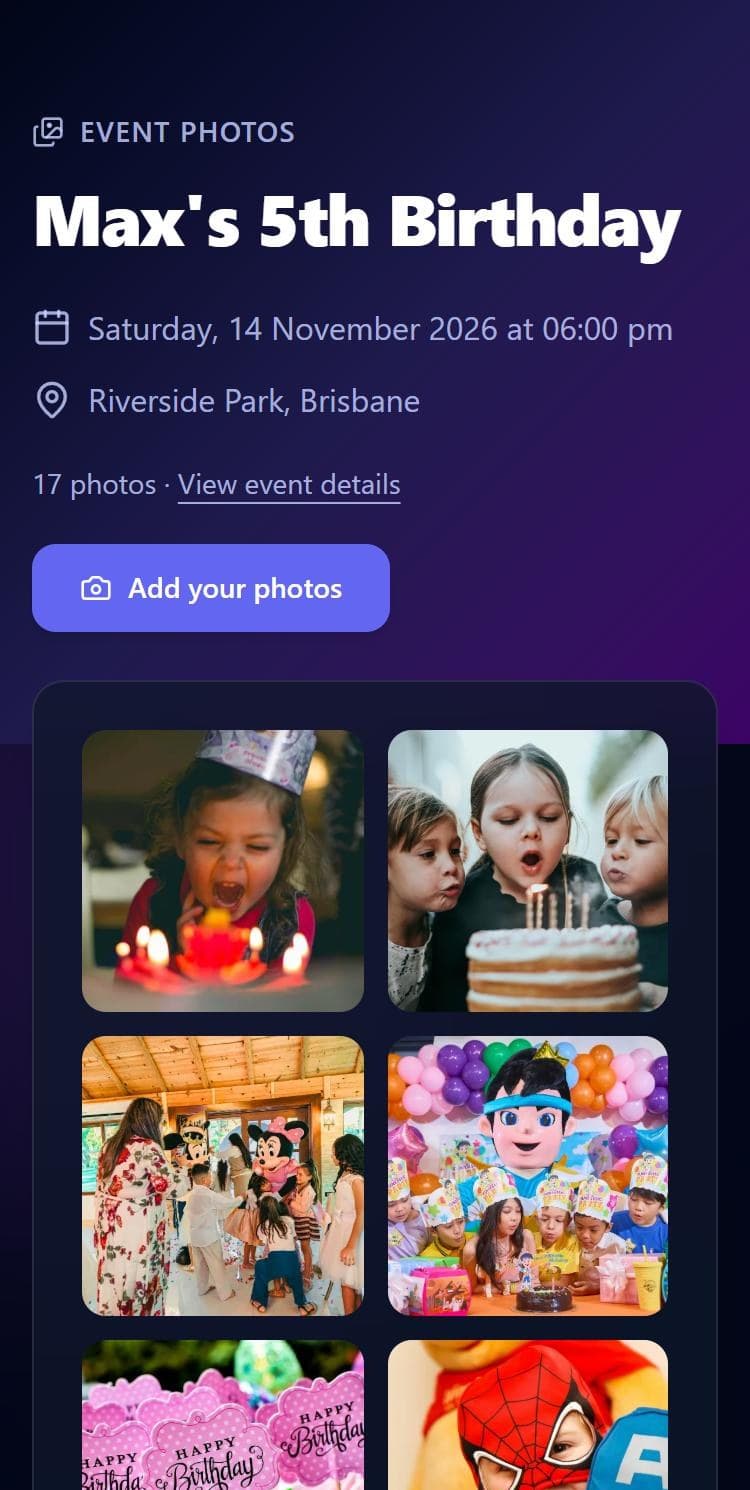
Stop chasing photos across group chats. Share a single link and everyone adds theirs, you as the host and every guest, so the whole day ends up in one place.

  • Hosts and guests can both add photos
  • One gallery link or QR for the whole guest list
  • Guests upload from their phone, no login
  • Download everything when the party is over
The shared event gallery on a phone, showing party photos from the host and guests
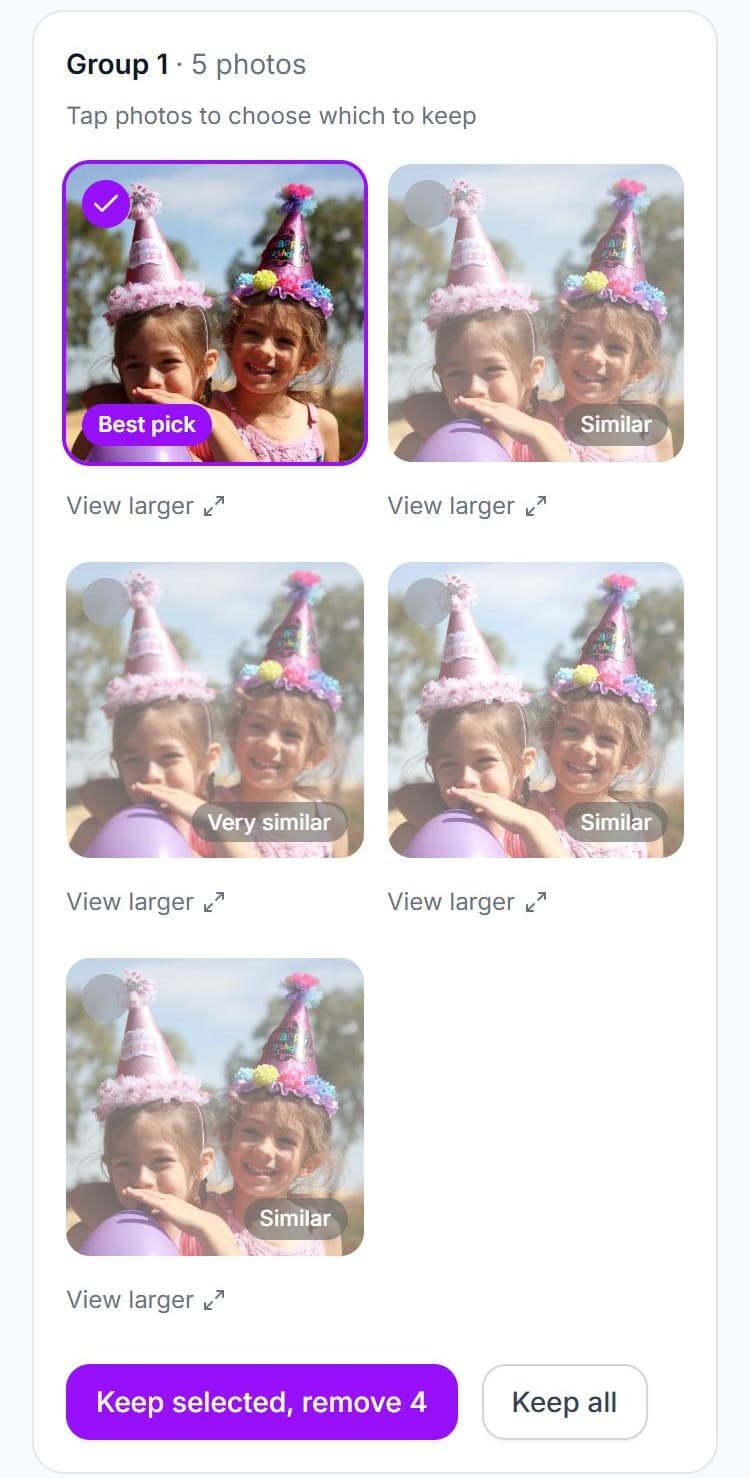
The Similar photos screen: five near-identical shots grouped, with the sharpest marked Best pick

Step 4 · Keep the best

Fifty near-identical photos? Not here.

When everyone shoots the same cake, you do not want ten copies of it. We find the duplicates and look-alikes for you, so the gallery stays worth scrolling.

  • Exact duplicates skipped

    The same file uploaded twice is caught before it is stored.

  • Look-alikes grouped

    Burst shots and near-identical angles are clustered together.

  • Best shot suggested

    The sharpest photo is pre-selected. Keep it in one click.

Questions hosts ask

Is BuzzInvite free?

It is free to start. You can create an event, send the invitation and collect RSVPs without paying.

Do guests need an account to RSVP?

No. Guests open your link or scan the QR code, answer a few questions and can edit their reply later from the confirmation email.

How do I see how many people are coming?

Your dashboard counts attending, maybe and declined replies and totals the adults and children, against your guest limit if you set one.

Can I see dietary needs and allergies for all my guests at once?

Yes. Each question gets its own chart showing how many people picked each option. Click a slice to list just those guests.

Can I tell who has opened my invitation but not replied?

The dashboard shows how many guests have opened your invite and how many of them have replied, so you know whether to send a nudge.

How do we collect everyone’s photos after the event?

Turn on the shared gallery. Guests add photos from their own phones to one private album, and near-duplicate shots are grouped so you can keep the best.

Host it. Remember it.

Invite your guests, collect the RSVPs, and end up with one clean gallery of the day.

Create your first event

Sign in with Google, Apple or your email.